
Keeping an AI Character Consistent Across Generations
Generate the same character prompt twice and you rarely get the same character twice — the hair color shifts, the jacket gains a collar it did not have before, the face reads as a different person entirely. There are real techniques that reduce this, and it is worth knowing both what they do and what they cannot do, because the honest answer is that full consistency is not something current tools reliably deliver.
Why the character changes between frames
An image model does not hold a persistent internal model of "your character" between generations the way an illustrator holds a character in their head while drawing a second pose. Each generation starts from noise and is shaped by the prompt text, the model weights, and a random seed, largely independent of any prior generation unless you explicitly feed one back in. Two prompts that read as identical to you — same words, same order — can still land on different points in the model's learned space of "a character matching this description," because the description under-specifies an enormous number of visual details the model has to fill in on its own, and it fills them in differently each time.
This is not a bug to be patched away so much as a structural property of how these models generate images. Every technique below works by reducing how much the model is left to fill in on its own, not by giving it actual memory of a specific character.
What seed locking does, and where it stops helping
A seed is the starting random state for generation. Using the same seed with the exact same prompt and settings produces the exact same image, which sounds like a complete solution until you try to use it for anything other than an identical image. The moment you change the prompt at all — a new pose, a different background, even reordering a couple of words — the seed no longer points to a consistent variation of your character. It points to a different image that happens to share a starting random state, which is not the same thing.
Where seed locking genuinely helps is in narrow, controlled edits: regenerating the same composition with one small change, or comparing how two prompt tweaks affect otherwise identical output. It is a debugging tool for isolating what a specific prompt change did, not a mechanism for generating "the same character, doing a different thing." Treat it that way and it will not disappoint you the way it does when used as the primary consistency strategy.
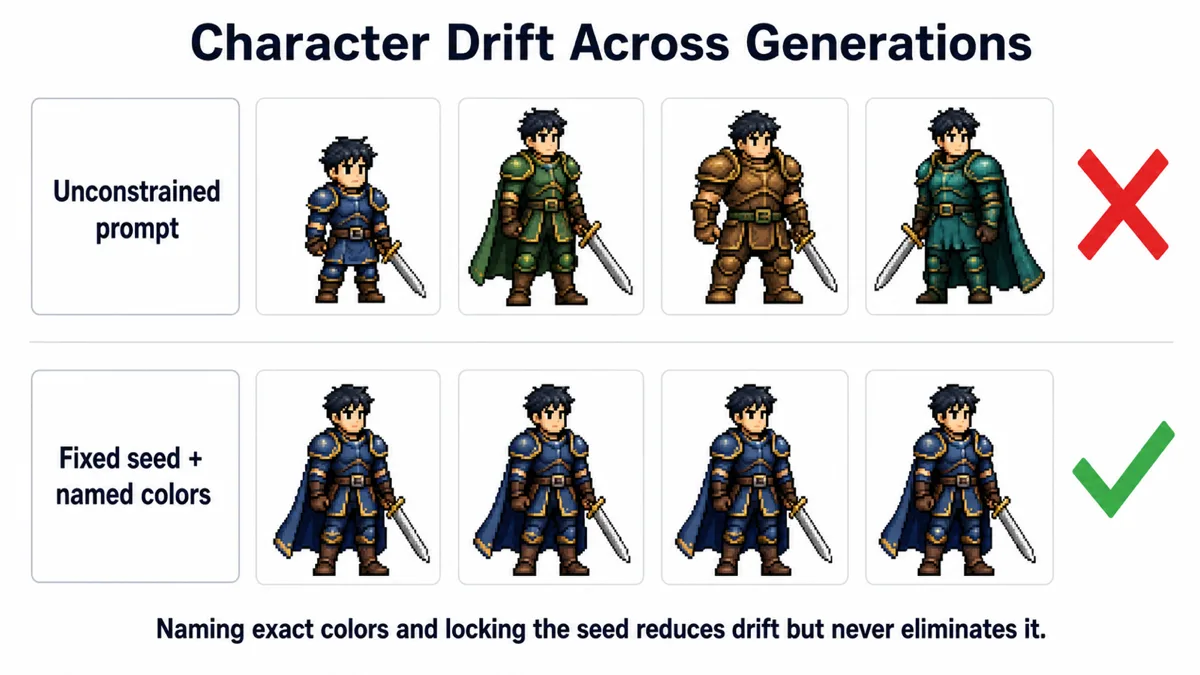
Locking down color and material in the prompt
The single highest-leverage change is being far more specific about the details you actually care about staying fixed, rather than trusting the model to infer them consistently. Vague color language ("a knight in blue armor") leaves room for a different blue every time. Specific, repeated anchoring reduces that room:
- Name exact colors the same way every time — "cobalt blue plate armor, dull silver trim, dark brown leather straps" rather than "blue armor with some metal bits." Reuse the identical phrase across every prompt in the set rather than rewording it for variety.
- Specify material alongside color — "matte leather," "brushed steel," "worn canvas" — because material affects how the model renders shading and highlights, and mismatched material rendering reads as inconsistency even when the hue is technically close.
- Keep a written character sheet of the exact phrases you are using and copy from it rather than retyping the description from memory each time. Small unconscious rewording between sessions is a common, avoidable source of drift.
This will not produce pixel-identical results, but it narrows the model's choices enough that the character reads as recognizably the same across a set, which is usually the actual bar for a project rather than exact reproduction.
Image-to-image and reference images
Rather than generating purely from text, image-to-image generation starts from an existing image — your established reference of the character — and applies the new prompt as a constrained transformation of it, controlled by a strength or denoising parameter. Low strength keeps the output close to the reference's composition and colors while nudging the pose or expression; high strength drifts back toward treating it as a loose starting point rather than a hard anchor.
This is meaningfully more reliable than text-only prompting for keeping a specific design element consistent, because the model has actual pixels to reference rather than a text description it has to reinterpret from scratch. The trade-off is that image-to-image inherits the reference's pose and composition more strongly than pure text-to-image does, so pushing for a very different pose while keeping strength low enough to preserve character design is a genuine tension — there is no setting that removes it, only a range you tune per generation.
Some tools also support a dedicated reference or character-image input separate from the main generation prompt, which conditions style and identity from that reference without forcing the same composition. Where available, this tends to outperform plain image-to-image for pose variety while holding character identity, though results still vary by model and are not guaranteed.
Generate fewer poses per batch
It is tempting to request a full sheet — eight poses, four expressions — in one prompt or one batch, hoping the model treats them as a set. In practice, requesting many variations at once does not make the model hold the character more consistently; it just multiplies the number of independent rolls where drift can occur, with no additional consistency mechanism tying them together.
Generating one or two poses at a time, checking each against your reference before moving to the next, and discarding or regenerating outliers immediately catches drift early, when it is one image to redo instead of finding out after generating sixteen that half of them do not match. It is slower per image but usually faster overall, because you are not throwing away large batches wholesale.
Fixing drift after generation: palette correction
Even with careful prompting, some color drift across a generated set is close to unavoidable with current tools. A practical fallback is correcting for it after the fact rather than fighting for perfect generation: pick your best, most representative image as the color reference, then apply a palette match or color-grade pass across the rest of the set so they share the same exact color values rather than merely similar ones.
This does not fix structural inconsistency — a different collar shape or a face that reads as a different person needs to be regenerated, not color-corrected — but for the common case of "the character is right except the jacket is a slightly different shade of red in three of these," a palette pass in any basic image editor closes that gap in minutes, far faster than re-rolling generations and hoping for a better match.
The honest limit
None of the above adds up to guaranteed consistency, and it is worth saying plainly: current general-purpose image models do not reliably hold a character's exact design across many independent generations, especially across different poses, angles, or lighting. Dedicated character-consistency features exist in some tools and improve the odds, but even those still produce occasional mismatches that need a human pass to catch. Budget for that pass — reviewing and discarding or fixing outliers — as a normal part of the workflow rather than an exception, and the process stays realistic instead of fighting the tool for results it is not built to guarantee yet.
Frequently asked questions
Will using the same seed for every pose keep the character consistent?
No — the seed only reproduces identical output for an identical prompt. Change the prompt for a new pose and the seed stops being a meaningful anchor. It is useful for isolating the effect of small prompt changes, not for generating variations of the same character.
Is image-to-image always better than text-to-image for consistency?
It is more reliable for preserving specific visual details, but it also pulls the output toward the reference's existing pose and composition. If you need a genuinely different pose, low-strength image-to-image may resist the change; you end up balancing pose freedom against consistency rather than getting both for free.
How many reference details should I put in the prompt?
Enough to pin the details you actually care about — hair color, outfit colors and materials, distinguishing features — without over-specifying every minor detail, which can make prompts brittle and cause the model to ignore parts of an overly long description. A focused, reused character description outperforms an exhaustive one that changes wording each time.
Can I fix a completely different face after the fact?
Not with color correction — that only addresses color and tone drift. A structurally different face or outfit is a generation problem and needs to be regenerated, ideally with a stronger reference image or a more tightly anchored prompt, rather than edited after the fact.
Explore more AI image workflow guides
Our Creative section covers practical workflows for working with AI-generated image sets, from prompting to post-processing.
Visit Creative