
Restore Trimmed Aseprite Frames from a Sprite Sheet and JSON
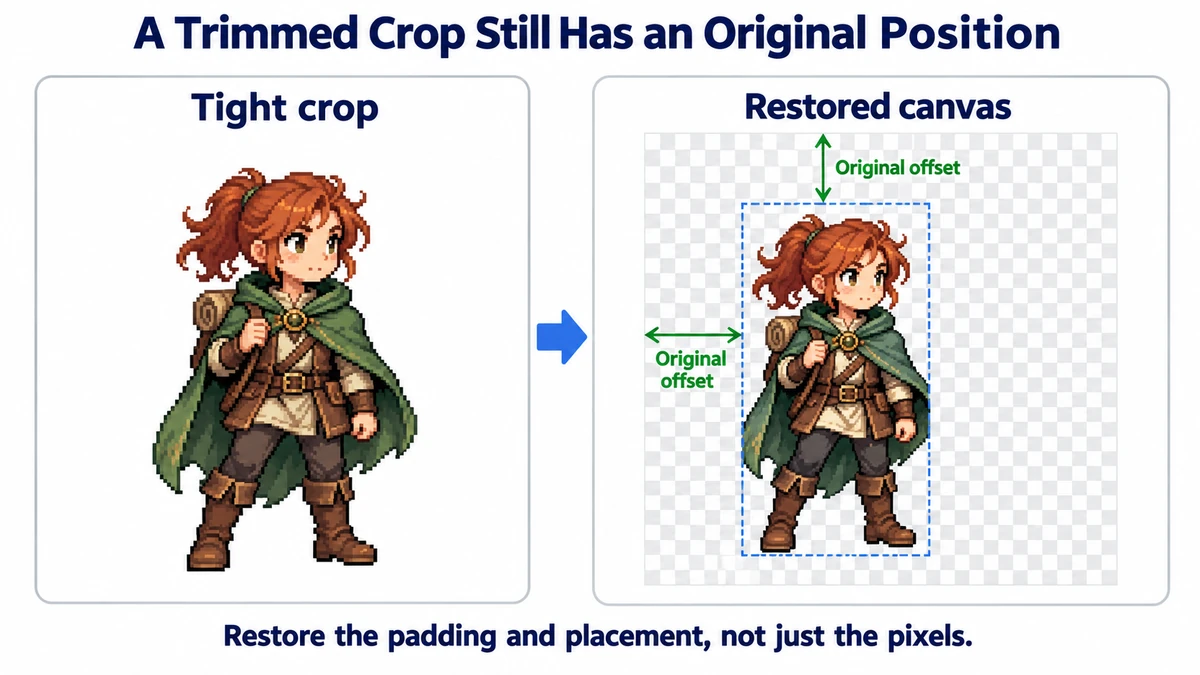
A packed Aseprite sheet saves texture space by cropping blank pixels around each pose. Cut those rectangles out naively and the character jumps around, because every crop has a different origin. The accompanying JSON is the missing map back to the original canvas.
Export two files from the same Aseprite session
- Open the animation in Aseprite and use File → Export Sprite Sheet. Export a PNG sheet and turn on JSON data output. The JSON hash and array forms are both accepted by the ImageMint unpacker.
- Keep the sheet and JSON together. A JSON file from an earlier export can point to rectangles that no longer match the sheet, even if both files have similar names.
- If you enable trimming or packed layout, keep the JSON. A simple equal-cell slicer cannot infer the original position of differently cropped frames from the sheet alone.
- Upload the exported sheet and JSON to the unpacker. Preview several poses before downloading the ZIP; do not rely on the first frame alone.
Three rectangles, three different jobs
Consider a character drawn on a 64 × 64 canvas. One trimmed pose occupies a 22 × 38 rectangle, located 19 pixels from the left and 20 from the top of the original canvas. Packing may place that crop at x=128, y=0 on the exported sheet. The JSON needs all three pieces of information:
| JSON field | Example | What it means |
|---|---|---|
frame | x=128, y=0, w=22, h=38 | Where to cut the pixels from the exported sheet. |
spriteSourceSize | x=19, y=20, w=22, h=38 | Where to place that crop on the original frame canvas. |
sourceSize | w=64, h=64 | The full canvas size to restore. |
The unpacker creates a transparent 64 × 64 frame, copies the 22 × 38 crop from the sheet, and draws it at (19, 20). Repeating that for every pose preserves the character's baseline. These field roles match Aseprite's sheet/JSON export documentation; the exact positions come from your own JSON.
What to inspect in the downloaded ZIP
Each restored frame is a numbered PNG. manifest.json lists the source frame names, durations in milliseconds, dimensions, and frame tags. Open an idle pose and the most extreme attack pose side by side: the canvases should be equal, and the feet or chosen anchor should stay stable. If playback still jumps, the drawings may have inconsistent alignment in the original Aseprite project; restoring crop offsets cannot fix that artwork problem.
.aseprite files or rotated packed frames. It supports up to 100 frames, 1024 pixels per restored frame side, and 20 million total frame pixels. If you see a rotation-related error, export without rotation and try again.If you only need equally spaced cells, the regular Sprite Sheet Slicer is simpler. Use JSON restoration when packing or trimming has destroyed the equal grid.
Diagnose a matching pair that still looks wrong
| Symptom | First check | Safe fix |
|---|---|---|
| meta.size does not match | Was the sheet resized after export? | Re-export both files from the same project. |
| Wrong pose appears in a frame | Did JSON come from another packing run? | Replace the pair, even if their dimensions match. |
| Canvas is right but the character shifts | Compare the original Aseprite poses. | Correct source alignment; do not erase trim offsets. |
| Rotation error | Was packing rotation enabled? | Export non-rotated frames. |
A matching filename is not validation, and matching dimensions alone do not prove that the crop coordinates describe the uploaded image. Two atlases can be equally large yet arrange the poses differently. Inspect a distinctive pose, such as an attack with an extended weapon, rather than judging only a near-identical idle frame.
Carry timing and tags into the next application
A frame whose duration is 200 ms should remain a longer hold than one at 80 ms. Restored PNGs carry pixels, while manifest.json carries durationMs and frame tags. Keep both. If you test the PNGs in a uniform-FPS player, a different rhythm is expected even when placement is perfect.
Tags identify ranges such as idle and walk, but retaining a tag is not the same as configuring an engine animation state. Check the ranges and playback direction in the receiving application. ImageMint’s preview is useful for alignment; it is not an automatic export of your engine’s animation controller.
Try the workflow
Load the sheet and its matching JSON to preview aligned frames and download full-size PNGs.
Restore Aseprite frames →