
Split a Tileset with Margins and Spacing Without Shifted Tiles
The first tile looks right, but every tile farther across the sheet includes more of its neighbor. That pattern usually means spacing was counted as part of the tile—or ignored entirely. Measure three independent values before cutting the sheet.
Measure tile size, border, and gap independently
Tile width and height describe the pixels you want in each output image. Outer margin describes the equal border on all four sides. Tile spacing describes the gap between adjacent tiles. A 32 px tile followed by a 1 px gap advances the next crop by 33 px, but still exports a 32 px image.
Inspect the source at native size in an editor with pixel coordinates. Do not estimate from a scaled browser thumbnail. This splitter has one margin value and one spacing value, so asymmetric borders or different horizontal and vertical gaps need preprocessing or manual slicing.
Work through a 135 × 102 source
- Upload a PNG or WebP with four columns and three rows of 32 × 32 tiles.
- Set Tile width to 32, Tile height to 32, Outer margin to 2, and Tile spacing to 1.
- Leave skipping and deduplication off for the first test, so the expected output is twelve files.
- Extract, inspect the preview, then open the ZIP and examine the final column and bottom row. The preview shows only the first sixteen exported tiles.
The width is 2 × 2 + 4 × 32 + 3 × 1 = 135. The height is 2 × 2 + 3 × 32 + 2 × 1 = 102. Crop x positions are 2, 35, 68, and 101; y positions are 2, 35, and 68. These numbers give a concrete way to check the settings without guessing.
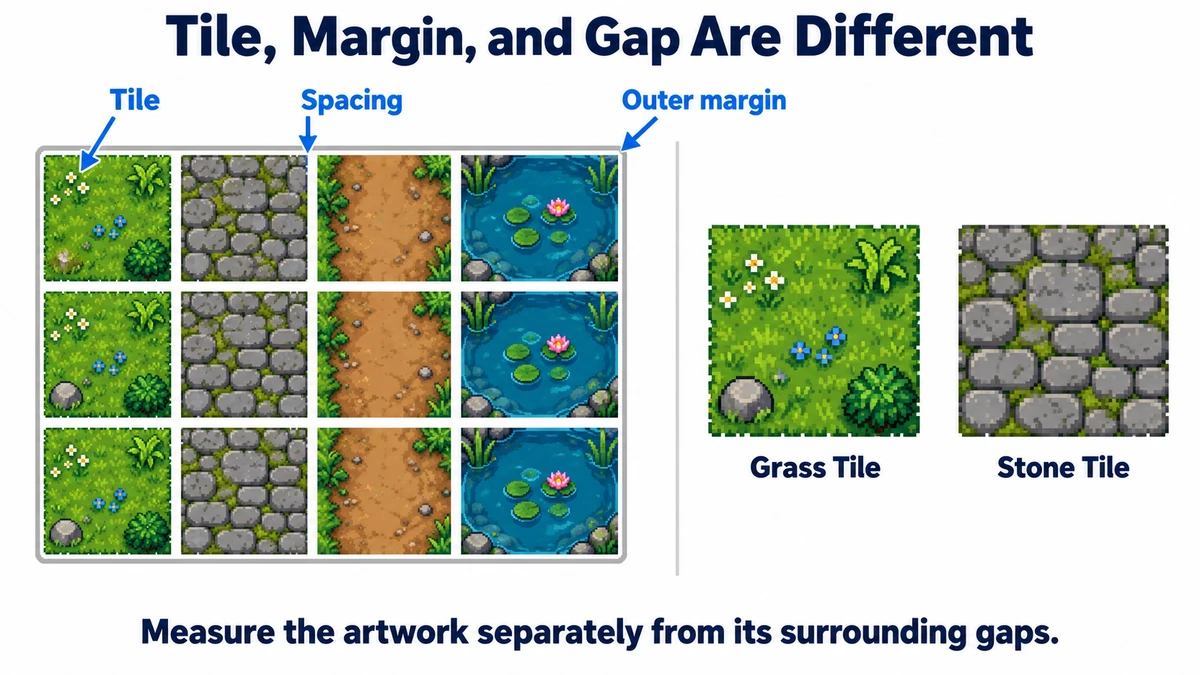
Read the error pattern before changing settings
| Pattern | Likely measurement issue | Check |
|---|---|---|
| Every tile shifted equally | Wrong outer margin | Coordinate of the first tile |
| Increasing horizontal shift | Wrong width or spacing | Distance between column starts |
| Increasing vertical shift | Wrong height or spacing | Distance between row starts |
| Missing last row or column | Incomplete final cells | Actual image dimensions and border |
Only complete cells are extracted. If you typed a larger margin than exists, the last tile may fall outside the allowed grid. The tool does not stretch a partial remainder to invent a complete tile. Fix measurements or prepare the source rather than compensating with an unrelated dimension.
Enable skipping and deduplication after the grid is correct
A skipped empty cell has alpha 0 everywhere. One faint pixel is enough to keep it. Deduplication uses exact RGBA equality, including RGB values hidden under alpha 0. It will not merge near-matching textures, and two visually identical transparent images can remain separate.
After these options are enabled, file number and source cell number need not match. Keep tilemap.json: its cells record row and column positions, with a tile ID for a kept asset or null for a skipped blank. Duplicate positions can reference the same ID. The manifest is a map of this extraction, not a ready-made engine tilemap.
Separate crop errors from engine seams
If the exported PNG already contains a neighbor’s border, fix the crop settings. If PNGs are clean but a game shows thin lines when moving the camera, investigate the engine’s filtering, scale, texture padding, and import configuration. Re-slicing clean tiles with arbitrary extra pixels hides the distinction and can damage the artwork.
Try the workflow
Set tile width, height, outer margin, and spacing, then export PNG tiles and a position manifest.
Open Tileset Splitter →