
CSS Sprites: When They Still Help and How to Build One
Most CSS sprite tutorials still open with the same line they used in 2009: sprites reduce HTTP requests, therefore sprites make your site faster. That argument was built on an HTTP/1.1 constraint that no longer exists on a modern server. Here is the honest version — what actually still justifies a sprite, what does not, and the exact background-position and retina arithmetic to build one that works.
What a CSS sprite actually is
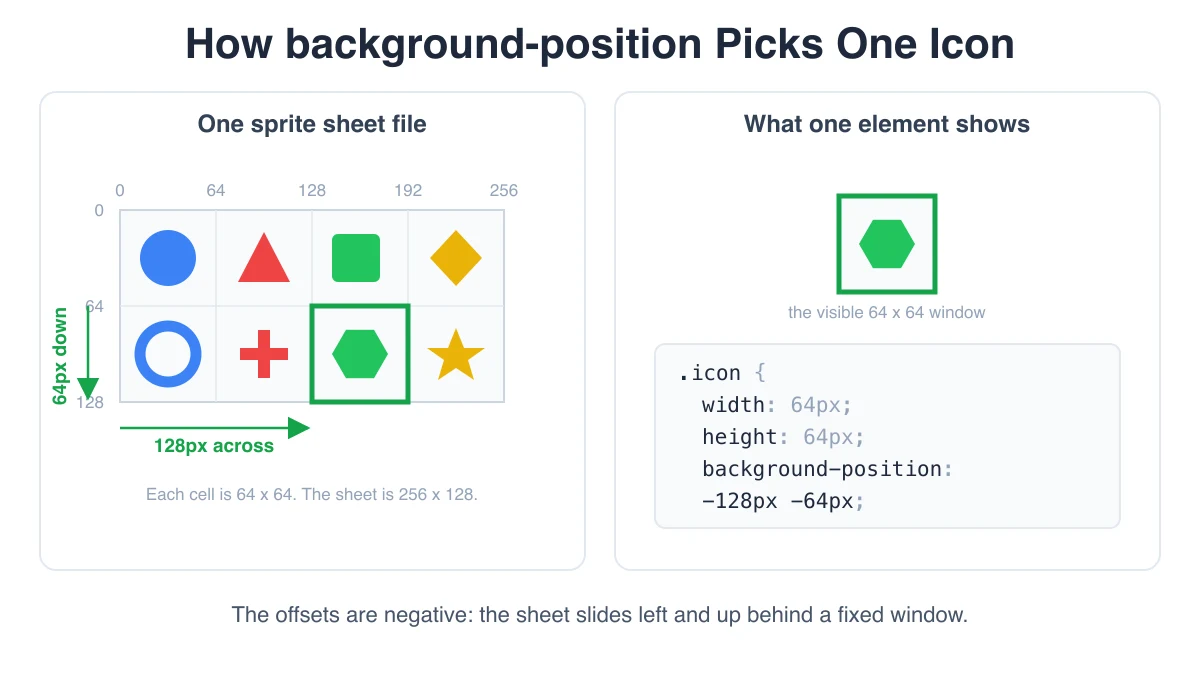
A CSS sprite is one image file containing many separate graphics, plus CSS that shows only one of them at a time. There is no cropping and no JavaScript involved. The element is given a fixed width and height, the whole sheet is set as its background-image, and background-position slides that sheet around behind the element so that the icon you want lands inside the visible box. The box is a window; the sprite sheet is a large sheet of paper being dragged behind it.
The one detail that trips people up on first contact is that the offsets are negative. You are not moving the window toward the icon, you are moving the sheet so the icon arrives at the window. To show an icon whose top-left corner sits 96 pixels from the left edge of the sheet, you push the sheet 96 pixels to the left, which is background-position: -96px 0.
A concrete example. Say you pack five 24×24 icons in a single row with 8 pixels of gutter between them, starting 8 pixels in from the left and 8 pixels down from the top. That makes the sheet 160×32. The third icon's left edge sits at 8 + 24 + 8 + 24 + 8 = 72 pixels, and its top edge sits at 8 pixels. The rule is:
| Declaration | What it does |
|---|---|
| background-image: url("/sprite.png") | Loads the whole sheet behind the element |
| background-repeat: no-repeat | Stops the sheet tiling and showing other icons around the edges |
| background-position: -72px -8px | Slides the sheet left 72px and up 8px so icon three lands at the origin |
| width: 24px; height: 24px | Clips the window to exactly one icon — this is what hides the rest |
| display: inline-block | Lets an inline element like a span honour width and height at all |
Change nothing but the two numbers in background-position and you get a different icon out of the same file. That is the entire mechanism.
The honest part: HTTP/2 changed the math
CSS sprites were invented to defeat a specific limitation. Under HTTP/1.1, a browser opened a small number of TCP connections per origin — commonly six — and each connection could carry only one request at a time. Forty icon files meant forty requests queued through six pipes, each paying connection setup and round-trip latency. Merging them into one file turned forty serialized requests into one. On a high-latency connection this was not a micro-optimization, it was often the single largest win available on a page.
HTTP/2 multiplexes. Many requests share one connection concurrently, without head-of-line blocking at the HTTP layer, and headers are compressed across requests. The specific problem sprites were invented to solve mostly evaporated. If a tutorial tells you in 2026 that sprites are faster because they cut request count, and stops there, it was written against a web that no longer exists.
So why does this article exist? Because "the original reason is gone" is not the same as "there is no reason." Several real advantages survive multiplexing, and they are the ones worth deciding on:
- Per-request overhead does not reach zero. Multiplexed requests are cheap, not free. Each still carries headers, a cache lookup, and a slot in the browser's resource scheduler. At five icons this is noise. At two hundred small icons it is measurable, and the sprite collapses it to one entry.
- Cache management gets simpler. One file means one cache entry, one Cache-Control policy, one hashed filename to invalidate. Two hundred separately versioned icon files is a build and deployment surface that has to be managed, and usually is not.
- Atomic versioning. All icons ship together, so you can never end up with a half-updated icon set where three icons came from cache in the old style and the rest are new. For a design system rollout this is a genuine correctness property, not just tidiness.
- No flash of missing icon. Once the sheet has loaded, every icon in it is available instantly. Individually loaded icons pop in one at a time as their requests resolve, which is most visible exactly where it is most annoying: a toolbar or icon grid rendering above the fold.
- Zero-latency state changes. A hover or active state that lives elsewhere on the same sheet is already downloaded. With separate files, the hover image is often not requested until the first hover, producing a blank flicker the first time a user touches the button. This was always one of the strongest arguments for sprites and HTTP/2 did nothing to weaken it.
When not to use a CSS sprite
A credible recommendation has to include the cases where the answer is no, and for CSS sprites there are several.
- Monochrome, scalable icons belong in SVG. An inline <svg> or an SVG sprite built from <symbol> and <use> scales to any size with no retina math, and inherits color through currentColor. For a typical UI icon set that is simply a better tool, and it is why sprite sheets have quietly lost most of their icon-system market share.
- One icon is never worth a sprite. If you have a single image, use a single image. The sprite adds coordinate bookkeeping and a build step for no benefit at all.
- Independently changing icons. Atomic versioning cuts both ways. If one icon changes, the whole sheet's cache entry is invalidated and every user re-downloads all of it. A frequently churning icon set is a bad sprite candidate.
- Anything needing recoloring or theming. A raster sprite bakes in its colors. Dark mode, brand theming, and state colors all mean either a second sheet or fragile filter tricks. This is the clearest structural advantage SVG has.
- Icons that must respond to font size. Sprites are pinned to pixel dimensions. If your icons need to scale with em alongside text, a vector approach handles it and a sprite fights you.
Sprite, SVG sprite, inline SVG, or icon font
| Approach | Scales cleanly | Recolor via CSS | Requests | Caching | Accessibility |
|---|---|---|---|---|---|
| CSS sprite (raster) | No — fixed pixels, needs a 2x sheet | No, only filter hacks | One for all icons | Excellent, one long-lived file | Background image, invisible to assistive tech — needs a text label |
| SVG sprite (symbol + use) | Yes, any size | Yes, via currentColor | One for all icons | Excellent, one file | In the DOM, supports title and ARIA |
| Inline SVG per icon | Yes, any size | Yes, full CSS control | Zero, embedded in HTML | None — re-sent with every page | Best, fully in the DOM |
| Icon font | Yes, scales with font-size | Yes, via color | One font file | Good | Poor — glyphs get read out or replaced by fallback fonts |
Read that table as a decision, not a scoreboard. Multi-color raster artwork — flags, logos, illustrated badges, screenshots of app icons — cannot be an SVG sprite in any sensible way, and that is the space where CSS sprites are still the correct answer rather than a legacy one.
Building one
The workflow is four steps, and only the third is fiddly by hand.
- Collect the icons. Export at their final display size (or double it — see the retina section). Keep them consistently sized where you can; a uniform grid makes the coordinate math trivial and the CSS regular.
- Pack them into one sheet. A simple row or a fixed grid is easier to reason about; a packer fills space better when sizes vary. Leave a gutter between icons.
- Read off the coordinates. Every icon needs its x, y, width, and height in sheet pixels. Doing this by hand in an image editor is where sprite work goes wrong, because a one-pixel misread shows up as a sliver of the neighbouring icon and nothing tells you why.
- Write the CSS. One shared base rule plus one small rule per icon.
The shared base rule matters more than it looks. Every icon needs the same background-image, background-repeat: no-repeat, and display: inline-block. Repeating the background-image URL in fifty rules is not a performance problem — the browser fetches it once regardless — but it is a maintenance problem: rename the sheet for cache busting and you now have fifty places to edit instead of one. So the pattern is a base class carrying everything shared, and per-icon classes carrying only position and size:
| Rule | Contents |
|---|---|
| .sprite | background-image, background-repeat: no-repeat, display: inline-block |
| .sprite-search | background-position: -8px -8px; width: 24px; height: 24px |
| .sprite-settings | background-position: -40px -8px; width: 24px; height: 24px |
In markup that is <span class="sprite sprite-search"></span>. In Sass the same idea is usually expressed as a placeholder, %sprite-base, pulled into each icon rule with @extend — which produces one grouped selector in the compiled output rather than repeating the declarations, and keeps the markup down to a single class per icon.
Retina and HiDPI: the background-size trick
This is the part most guides either skip or get wrong. A raster sprite drawn at 1x looks soft on a 2x display, and the fix is not to change your offsets — it is to pack at double resolution and then tell CSS the sheet is half the size it really is.
Take the earlier example and double everything at export time: icons are 48×48 real pixels, the gutter is 16, and the sheet comes out 320×64 real pixels. Now set background-size: 160px 32px — exactly half the sheet's true dimensions. The browser scales the entire sheet down to a 160×32 CSS-pixel coordinate space and maps the extra detail onto the device's physical pixels on a HiDPI screen.
The payoff is that every other number in your CSS stays in the original 1x coordinate system. The third icon is still background-position: -72px -8px with width: 24px; height: 24px, unchanged, even though its actual pixels live at 144, 16 in the file. You compute offsets once, in CSS pixels, and the single background-size declaration on the base class handles the density mapping for every icon at once.
Two things follow from this that are worth stating explicitly. First, background-size belongs on the shared base rule, not repeated per icon. Second, do not serve two sheets behind a media query unless you have a strong reason: the 2x sheet at half size looks correct on 1x displays too (the browser just downsamples), so one sheet and one rule covers both cases, at the cost of the larger file. Given that a well-compressed icon sheet is usually small, that trade is normally worth it — and it sidesteps the awkward middle ground of fractional device pixel ratios like 1.5 and 2.5, where a media-query switch has to pick a side and one of them will be wrong.
Hover and state variants
The classic sprite layout for interactive elements is a grid where each column is an icon and each row is a state: default on row one, hover on row two, active or disabled on row three. Because the columns do not move, a state change is a pure Y shift and the X offset stays exactly as it was.
With 24px icons and an 8px gutter, row one sits at y = 8 and row two at y = 40. The third icon's default rule is background-position: -72px -8px and its hover rule is background-position: -72px -40px. If you set the vertical step as a variable — say --sprite-row: 32px — you can express the hover state once on the base class using calc() against a per-icon X variable, instead of writing a second rule for every icon.
This is where the sprite genuinely still beats separate files: the hover pixels arrived with the default pixels, so the first hover is instant. It is also why you should keep states on the same sheet rather than splitting them — a separate hover sheet reintroduces exactly the request-on-first-hover flicker the layout was meant to prevent.
Padding, and why bleeding is milder here than in games
Packing images adjacent to each other creates the possibility that a sampler reaches past an icon's boundary and drags in a neighbour's color. In game engines this is a constant, well-known hazard because textures are minified, mipmapped, filtered, and drawn at arbitrary sub-pixel transforms.
CSS sprites live in a gentler environment. There are no mipmaps, backgrounds are normally composited at integer positions, and at exactly 1:1 with no transform, no sampling crosses the boundary at all. But "milder" is not "never," and it goes wrong in predictable places: fractional device pixel ratios (1.5, 2.25, 3), browser page zoom at odd percentages, any transform: scale() on an ancestor, and the background-size downscale from the retina section — all of which put icon edges on non-integer device-pixel boundaries where the compositor has to interpolate.
The fix is the same and it is cheap: leave a small transparent gutter, 2 to 4 pixels at 1x (so 4 to 8 in a 2x sheet), between every icon and around the outside edge of the sheet. It costs a trivial amount of file size and removes an entire class of "there is a faint line on the left of this icon and only on my laptop" bug reports. For the deeper version of this problem — extrusion, mipmap bleed, and power-of-two sizing — the game-engine equivalent is covered in Sprite Atlas Packing: Padding, Power-of-Two, and Bleeding.
Common failure modes
- Neighbouring icons showing at the edges. The element's box is bigger than the icon, so the window exposes sheet content past it. Either the width/height is wrong or padding on the element is inflating the box — check whether box-sizing: border-box is in play, because it changes what your declared width includes.
- Forgetting background-repeat: no-repeat. The default is repeat, so the sheet tiles and you get fragments of other icons filling the box. This one is easy to miss when the icon happens to sit near the sheet's origin and looks almost right.
- A span with no dimensions. Inline elements ignore width and height entirely, so an empty <span> with a sprite class collapses to zero size and nothing renders. Set display: inline-block (or block, or make it a flex item) on the base class.
- Stale sheet after a rebuild. You repack the sprite, the coordinates shift, but a returning visitor still has the old sheet cached against your new CSS — so every icon is subtly wrong for them and perfect for you. Cache-bust by changing the filename on every rebuild (a content hash, sprite.a1b2c3.png) rather than relying on a query string or on users hard-refreshing.
- Half-pixel offsets. Odd icon sizes, odd gutters, or an odd starting margin in a 2x sheet produce fractional offsets after the halving, and fractional offsets are exactly what causes edge fringing. Keep every dimension in the 2x sheet even.
Frequently asked questions
Are CSS sprites obsolete in 2026?
The original justification is obsolete; the technique is not. Under HTTP/2 and HTTP/3, cutting request count is no longer a compelling reason on its own. What survives is the icon-set case with many small raster graphics, where one cache entry, atomic versioning, no per-icon load pop-in, and instant hover states still add up. For monochrome UI icons, though, SVG has genuinely superseded the raster sprite — using one there in 2026 is choosing the worse tool.
CSS sprite or SVG sprite — which should I use?
Decide on the artwork, not the delivery. If your icons are flat, geometric, and monochrome or two-tone, use an SVG sprite: it scales without a 2x sheet, recolors through currentColor, and lives in the DOM where assistive tech can reach it. If your images are photographic, gradient-heavy, or genuinely multi-color raster art — flags, product thumbnails, platform logos, pixel art — SVG has nothing to offer and a raster CSS sprite is the right choice.
How large can one sheet get before it hurts?
Two separate limits. Practically: the sheet is render-blocking for every icon on it, so a sheet large enough to delay first paint has stopped helping — keep it in the low hundreds of kilobytes and split rarely-used icons (admin screens, settings panels) into a second sheet loaded only where needed. Technically: browsers and mobile devices cap decoded image dimensions and total canvas memory, and very large sheets can be silently downscaled or fail to decode on low-memory phones. A sheet beyond roughly 2000 pixels on a side is worth splitting on that basis alone, and remember a 2x sheet is already double the dimensions you designed.
Can I recolor a sprite icon with CSS?
Not really, and this is the honest answer rather than the convenient one. The colors are baked into the raster file. You can approximate it with filter — chaining invert, sepia, saturate, and hue-rotate to push a black icon toward a target hue — but it is a hack in the literal sense: the values are found by trial or a solver, they do not hit an exact brand color, they break on multi-color art, and they are unreadable to the next person on the codebase. A second sheet in the alternate color is more honest than a filter chain. If recoloring is a real requirement, that requirement is telling you to use SVG.
Pack your icons into a sprite sheet
Sprite Gen takes the images you drop in, packs them into a single sheet with the padding you set, and writes out the coordinates so you never have to read offsets off a canvas by hand. Pick CSS and you get a shared base rule carrying background-image, background-repeat: no-repeat and display: inline-block, plus one rule per sprite with its negative background-position and pixel width and height — exactly the structure described above. Pick SCSS and the same output arrives as a %sprite-base placeholder with each icon rule pulling it in via @extend. Pick JSON and you get the raw frame coordinates instead, for feeding into your own tooling. The whole thing runs in your browser — nothing is uploaded anywhere.
Open Sprite Sheet Generator